Wednesday, 28 August 2013

Afrihost DNS issues - work around until issues are solved 28 August 2013


Afrihost ADSL clients may experience errors with Web Browsing, YouTube access, Sending & Receiving Email and other services due to a DNS error on MTN network.

Here is a solution until the issues are solved

If your router has Afrihosts DNS servers in it or its set on 'Obtain  DNS automatically' ,  Log into your router and change it to Googles DNS


Primary DNS: 8.8.8.8
Secondary DNS: 8.8.4.4

If your router is set on obtain automatically your can use an alternative method but will have to do this on each individual computer.

Go to your network adaptor (wireless or LAN  local area connection) settings right click select properties.Select  Internet protocol version 4 (TCP/IP v.4) >>> Click 'Properties'
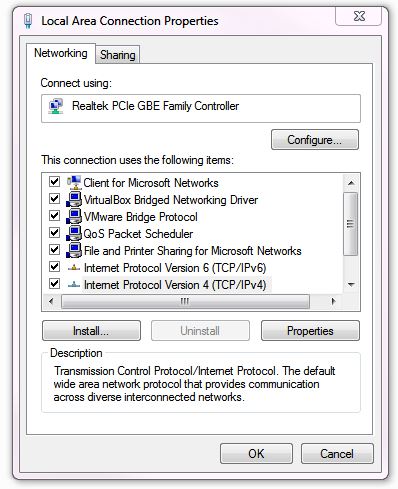
Then select the radio button  'Use the following DNS server adresses:'  put in Googles Primary  & Secondary DNS settings mentioned above. Click okay and now you should have browsing and email access again


If you have any questions please leave comments.

Tuesday, 27 August 2013

Microsoft Office 2013 - Error opening word and excel files that have been downloaded or sent to you as attachments.


How to fix an error opening word and excel files that have been downloaded or sent to you as attachments in Microsoft Office 2013

 Below: Error message
 image thumb How to remove protected view from Office 2013 when downloading documents from the web

The message that has nothing to do with the actual problem, and the problem is actually a Microsoft feature, as often is:

- Office now has a  "protected-mode" feature, which prevents office apps from doing certain things under certain conditions.
- One of them is to stop excel / word from opening attachments coming from outlook.

Click the Microsoft Office ButtonButton image, and then click Word Options. or Excel  depending on what you having a problem with.
 image thumb2 How to remove protected view from Office 2013 when downloading documents from the web 

Below: Click Trust Center, and then click Trust Center Settings. image thumb3 How to remove protected view from Office 2013 when downloading documents from the web 

Below: Click the "Protected View"  in the left menu and untick all 3  check boxes on the right.
'
image thumb4 How to remove protected view from Office 2013 when downloading documents from the web

Save and voila, suddenly  word / excel can open all your files and has absolutely no problems with your gigs of free memory.
Thanks to the brilliant minds who conceived such an awkward feature with awkward error messages and ultra-deep menu options to clear - and of course no simple help. LOL